

Passing rich text as an embed variable safely?
How Do I?

I have content that breaks on the frontend whenever my rich text field has a single or double quote in it. This is because I’m passing a rich text field as an embed variable to a partial file that renders the html for that widget. This is within a fluid field. sample code below.
Depending if i wrap it around a single quote or double quote in the embed line, that’s when it breaks on the frontend once it encounters same character in the rich text content. (Meaning if it encounters href=”” or a word like “that’s”) it will stop displaying rest of content on the frontend.
Is there a way to pass these safely to the partial template so those characters are escaped and don’t break on the frontend? Or is there a way to display them properly from the partial template?
- description=’{content:description}’
- description=”{content:description}”

Would the att_safe variable modifier help?
https://docs.expressionengine.com/latest/templates/variable-modifiers.html#attr_safe
:attr_safe apparently strips out all html tags, which isn’t what i want here as it’s generic content and I still want all the html tags such as p tags and img tags
What’s the use case for this? HTML attributes weren’t designed for raw HTML code.
I have many CTA widgets that have a basic “description” field. I want these to be rich text so client can put whatever they want in there.
For every page i have one giant fluid field that has a list of all the widgets (usually grid fields for each widget). I loop thru all possible widgets and pass each widget fields to specific partial html file that renders the markup for that specific widget.
That means I need to take rich text fields that could have paragraphs, img files, links, etc. Right now once it encounters a single or double quote in the rich text it breaks on frontend and nothing after that works. Meaning I can’t even have a basic link in the rich text because it breaks on the href=”” unless i passed the template variable with single quotes like description=’{content:description}’. Doing single quotes fixes the href=”” but once it hits a word like (that’s) it will break then. Gotta be a way to easily pass/render rich text like this
any other suggestions to try?
How and where are you using description="{content:description}" ?
I have a template that loops through my fluid field and checks for all the page widgets (mostly grid fields). i have multiple widgets with a rich text field. I simply want to pass those inside an embed template that spits out the html for that specific widget. attached is a screenshot
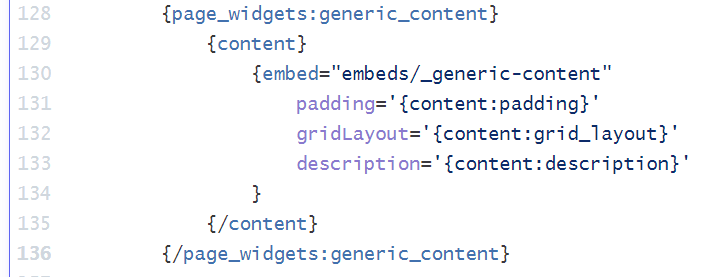
Ah OK, I suspect that the template parsing may be getting in the way, i.e. the value of the {content:description} field is parsed before the embed template, hence why it’s spitting out raw HTML before it’s needed.
Can you try replacing the embed with a template partial
{content}
  {partial_generic_content_template}
{/content}
Then in the partial template output your content tags:
{content:padding}
{content:grid_layout}
{content:description}thanks Rob. That seems to work with template partials so ya it must’ve been a parsing issue. Partials however you can’t really use files within say Visual Code to edit. I’d have to do all the editing within the cms for each widget. Not the end of world though.
Another solution I could prob. do is just not use an embed or template partial and just put code for each widget directly in my “fluid-field-file”… this way i can edit it all within Visual Code and still use a template file
Glad you got it working.
Yes of course you don’t have to use embeds or partials - both are handy and have their use cases. Depending what I’m building I might put an entire fluid field inside a partial, then use the partial in one or more templates where needed, other times I’ll put the whole fluid field directly in a regular template - both will work.