

Upgrade new/edit item error
How Do I?

Dear Hive Mind
I upgraded from EE2 to EE6.4.14 many months ago and, despite editing a lot of content, I have just discovered that I cannot add or edit any new fields. When I try to add a new field, I get the below error message. Does anyone have any ideas what I can do about this? It is problematic as, having been updating content, it would be very difficult to run the update again, as this is a very big site.
Any help would be greatly appreciated.
Many thanks Gabe
Exception Caught
Unknown field ChannelEntry.field_id_11
ee/ExpressionEngine/Service/Model/Query/Select.php:709

Stack Trace: Please include when reporting this error
#0 ee/ExpressionEngine/Service/Model/Query/Select.php(520): ExpressionEngine\Service\Model\Query\Select->translateProperty('field_id_11')
#1 ee/ExpressionEngine/Service/Model/Query/Select.php(124): ExpressionEngine\Service\Model\Query\Select->applyOrders(Object(ExpressionEngine\Service\Database\Query), Array)
#2 ee/ExpressionEngine/Service/Model/Query/Select.php(49): ExpressionEngine\Service\Model\Query\Select->buildQuery()
#3 ee/ExpressionEngine/Service/Model/DataStore.php(275): ExpressionEngine\Service\Model\Query\Select->run()
#4 ee/ExpressionEngine/Service/Model/DataStore.php(220): ExpressionEngine\Service\Model\DataStore->runQuery('Select', Object(ExpressionEngine\Service\Model\Query\Builder))
#5 ee/ExpressionEngine/Service/Model/Query/Builder.php(150): ExpressionEngine\Service\Model\DataStore->selectQuery(Object(ExpressionEngine\Service\Model\Query\Builder))
#6 ee/ExpressionEngine/Service/Model/Query/Builder.php(63): ExpressionEngine\Service\Model\Query\Builder->fetch(false)
#7 ee/legacy/fieldtypes/EE_Fieldtype.php(845): ExpressionEngine\Service\Model\Query\Builder->all()
#8 ee/legacy/fieldtypes/OptionFieldtype.php(548): EE_Fieldtype->_get_field_options(Array)
#9 ee/legacy/libraries/api/Api_channel_fields.php(381): OptionFieldtype->getPossibleValuesForEvaluation(Array)
#10 ee/ExpressionEngine/Model/Content/FieldFacade.php(307): Api_channel_fields->apply('getPossibleValu...', Array)
#11 ee/ExpressionEngine/Model/Content/FieldModel.php(73): ExpressionEngine\Model\Content\FieldFacade->getPossibleValuesForEvaluation()
#12 ee/ExpressionEngine/Controller/Fields/Fields.php(884): ExpressionEngine\Model\Content\FieldModel->getPossibleValuesForEvaluation()
#13 ee/ExpressionEngine/Controller/Fields/Fields.php(287): ExpressionEngine\Controller\Fields\Fields->form(Object(ExpressionEngine\Model\Channel\ChannelField))
#14 [internal function]: ExpressionEngine\Controller\Fields\Fields->create('25')
#15 ee/ExpressionEngine/Core/Core.php(266): call_user_func_array(Array, Array)
#16 ee/ExpressionEngine/Core/Core.php(122): ExpressionEngine\Core\Core->runController(Array)
#17 ee/ExpressionEngine/Boot/boot.php(161): ExpressionEngine\Core\Core->run(Object(ExpressionEngine\Core\Request))
#18 admin.php(144): require_once('...')
#18 admin.php(144): require_once('...')
Whats type of field is field_id_11 ?
This can be found in the exp_channel_fields table – under column field_type
Thanks,
-Tom Jaeger
Hi Tom
Thanks for your response. I have looked at the exp_channel_fields table and there is no field with the name field_id_11.
There is another table called exp_channels_channel_fields, but there is no such field in there either.
Sorry I can’t be any more helpful.
Cheers Gabe
in the exp_channel_fields folder, there should be a “field_id” column… Do you see one that has a value of 11 ?
If so, what is the field_type for that one?
Sorry if my wording was confusing. There is no entry in the exp_channel_fields table that has a field_id of the value 11. Please see the attached screenshot.
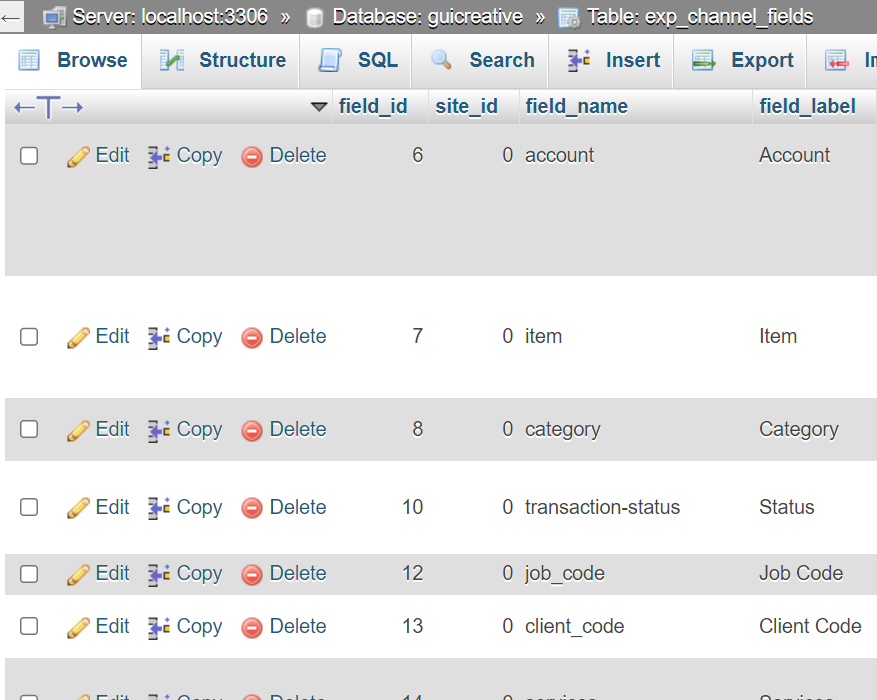

Bleh- it looks like it thinks there should be! Somewhere in there, the data are off a wee bit, but it’s hard to tell where. Is this creating ANY type of new field, not just a select? Do you have a field_id_11 in exp_channel_data? Or a table with an id 11 on it- of any type. Like exp_channel_data_field_11? Just trying to figure out where that field id is coming from.
It is any type of new field. That’s just what happens when you click the “New Field” button in the Fields section.
I went into the database and search for field_id_11 with single angled quotes, but nothing came up. I searched for field_id_11 with no quotes and it came up with 13,000! Largely because of fields 110, 111, 112, etc.
There is no exp_channel_data_field_11.
I can see no tables with id 11.
There is no field_id in exp_channel_data. Only entry_id, site_id and channel_id.
Could I send you the database?
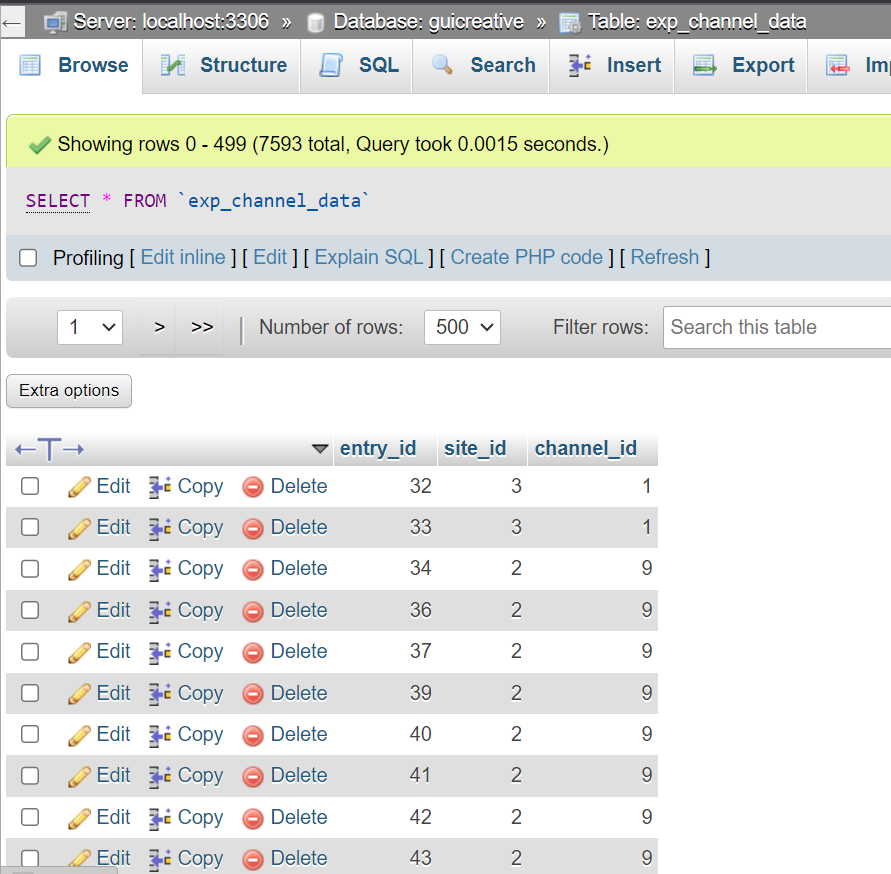

Hit us in [email protected] and we’ll take a closer look. Somewhere in there, it’s thinking that field exists.
Wheeee- that one was buried deep. Looks like a select type field was being populated by the contents of… field_id_11- it was in the exp_channel_fields field_pre_field_id column. Just required updating the field to change that.
Though be careful- existing entries that have something selected? May have validation issues if you try to save them and the selection is not something that exists in the current state. You don’t need the field to exist, but you need the options if they’re already selected and you’re editing.