

Default site (menu entry)
How Do I?

Hi,
how do I create a new menu entry in the default site of EE7? My guess is, that I have to edit one of the templates, but I haven’t found the right one, so far. For the present look, see the attachment.
TIA,
Claus


That file is a partial called snp_main_nav.html.
In the backend you have to go to the template partials section. You can also edit the file located in /system/user/templates/default_site/_partials.
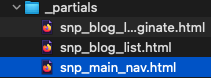
Thanks, found it. I managed to create a new template group ‘testing’ & an index page with some content, but there are no style sheets. How do I reference those?
Claus
I typically manage my css and js outside of EE in /public_html/assets/css and /public_html/assets/js and call them as you normally would in an html document.
Oh, I see.Thanks.
Claus
P. S.: I have installed EE 7 locally, and I tried … <link rel=”stylesheet” type=”text/css” href=”localhost/public_html/css/style_sheets.css”> …, but this didn’t work. The location of the style sheets is /public_html/css/style_sheets.css. My question: What would be the correct location?
The answer to that question isn’t going to be the same for every application. It seems like you’ll want to make it relative to your site’s url so based on your example:
<link rel="stylesheet" href="/css/style_sheets.css">
If you have lots of questions unrelated to the original thread I highly recommend you visit the ExpressionEngine Slack.
> If you have lots of questions unrelated to the original thread I highly recommend you visit the ExpressionEngine Slack.
Ok, thanks. It seems, though, that I have to be invited by someone on Slack. I cannot login to the EE workspace.
Claus
Hi again,
regarding the original thread: I’m asking myself how do I accomplish it that the menu entries are horizontally aligned (see my first question in this thread)? In the default site, it is accomplished via a css class main-nav, but the original style sheets unfortunately have no structure whatsoever & are barely legible.
TIA,
Claus
P. S.: Found the solution myself.