

SOLVED - Taking page from channels to display on navigation
How Do I?

We have a new event set up in our webpage:
For example:
www.abc.com/event1
When someone clicks on “Registration” inside Event1, I want the page to be:
www.abc.com/event1/registration
Registration page is inside channel, whereas Event1 is in template
When I try to execute the following code using channel, nothing else on the event1 page gets displayed:
{exp:channel:entries channel="event1" limit="1" require_entry="yes"  url_title="{segment_2}"}
{if no_results}{redirect="404"}{/if}
{Head}

  <title>{if page_html_title != ""}{page_html_title}{if:else}{title} | {website_title}{/if}</title>
How do I use this inside any navgiation of Event1, or on the template to work?

Niraj, I’m having a little bit of a hard time understanding what you’re trying to accomplish so let me restate it and see if I’ve got this correct.
You have a template in event1.group/index.html
You also have a channel entry called “Registration” inside a channel named “Event1”.
On the event1.group/index.html template, you have a link to “Registration” which is event1/registration. If I’m correct to this point, then once a user clicks on that link, ExpressionEngine looks for a template called event1.group/registration.html. If that template is not found, then it falls back to event1.group/index.html template.
This should bring us back to your opening channel entries tag from above {exp:channel:entries channel="event1" limit="1" require_entry="yes" url_title="{segment_2}"}
That should work if there is a channel entry with a url_title of “registration”. If that entry exists and the above tag returns no results, then there are a few things to check:
* Are you using the Pages add-on and have a Pages URI set in the pages tab
* try adding dynamic="no" to your opening channel entries tag
If you’re still not getting the result you’re expecting, please clear up anything I missed above and post all of your templates.
Sidenote: If you want a better understanding of how EE parses URLs, there’s a great schematic here: 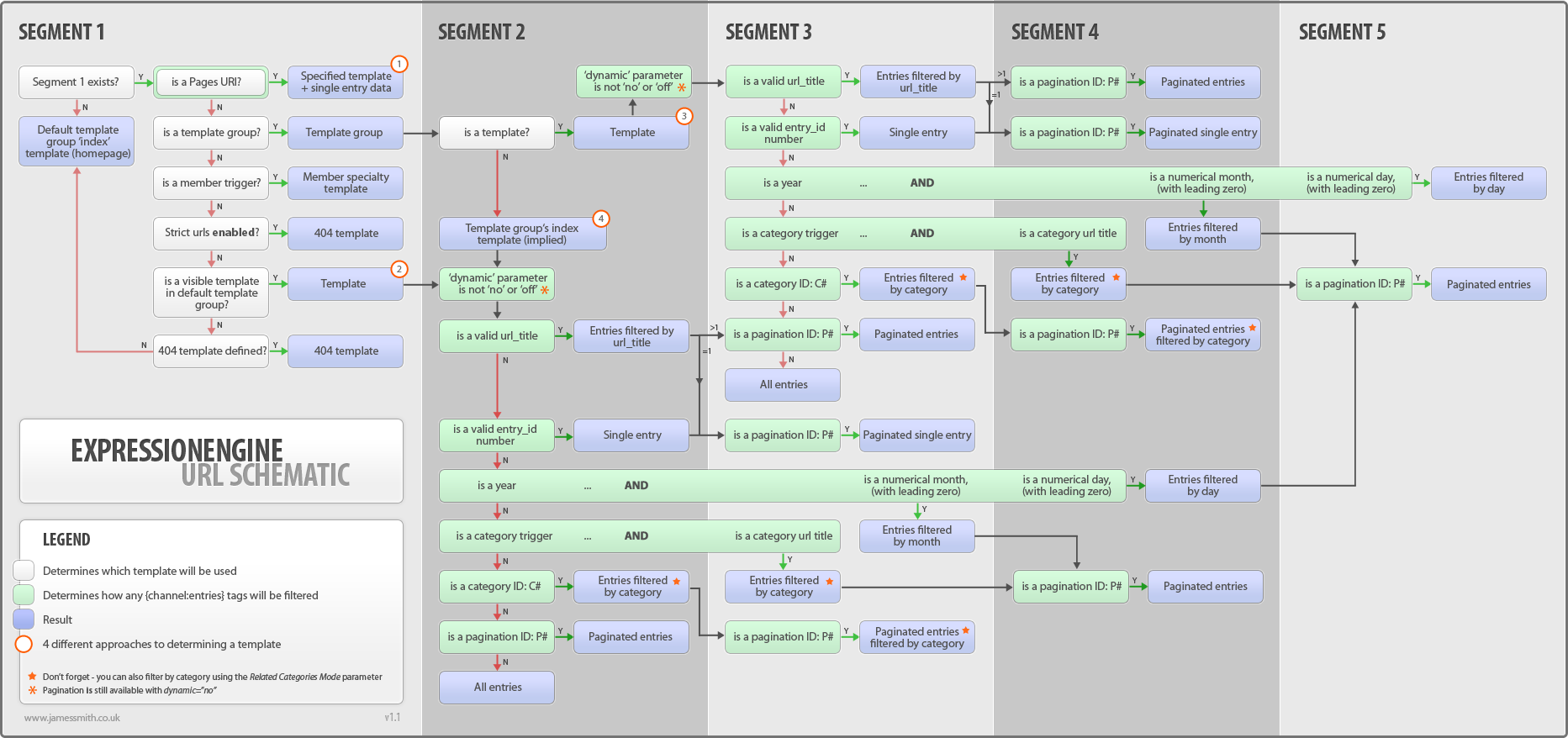 (it’s missing a couple newer items such as categories and template routes, but overall is still accurate)
thanks!
Hi Andy,
Thank you for the info and help. However, this got me more confused.
Here is the real scenario:
We had a event set up by our old developer:
landandgroundwater.com/ecoforum/about ; here the page “ecoforum” is in templates and “about” is in channel named “ecoforum”
the code inside the template page “ecoforum” is:
{exp:channel:entries channel="ecoforum" limit="1" require_entry="yes"  url_title="{segment_2}"}
{if no_results}{redirect="404"}{/if}
{Head}

                           <title>{if page_html_title != ""}{page_html_title}{if:else}{title} | {website_title}{/if}</title>

<meta property="og:title" content="{page_meta_title}" />
<meta property="og:description" content="{page_meta_description}" />
<meta property="og:image" content="{page_meta_picture}" />


                           <meta name="description" content="{page_meta_description}">
                           <meta name="keywords" content="{page_meta_keywords}">

                           <link rel="canonical" href="landandgroundwater.com/ecoforum/{url_title}" />
Due to this code, the page “ecoforum” is itself not loading. But if I put a channel page after its url, it loads.
This year, I wanted to build a similar page; landandgroundwater.com/ecoforum2022
Here, there is navigation built inside the page “ecoforum2022”. Again this page is inside templates.
is it possible that when someone clicks “registration” here, I can redirect them to a channel entry; for example a new channel called “ecoforum2022”
So that the url becomes “landandgroundwater.com/ecoforum2022/registration”
currently, with the example and code I have with a past event “Ecoforum” I am not able to figure out the way
Is there any way I could use the redirection inside navigation? <a href=”{redirection code}”>
Also, there is no template or template group as: event1.group/index.html as you have mentioned the event page is simply built inside dynamic template
Thank you Warm regards, Niraj Niraula
Niraj,
Have you tried adding dynamic="no" to your channel:entries tag?
{exp:channel:entries channel="ecoforum" limit="1" require_entry="yes" url_title="{segment_2}" dynamic="no"}
This will tell EE to not try and automatically parse the URL, but rather only look for an entry with the url_title that equals {segment_2}
Hi Andy,
taht did some magic. I am not sure what worked but it did bring the result :D
Thank you for your help, appreciate it
The dynamic="no" parameter essentially tells EE not to automatically try to find an entry associated with your URL segments and instead do what you tell it to in the url_title or similar parameter.
https://docs.expressionengine.com/latest/channels/entries.html#dynamic