

6.1 breaks CSS styles in channel forms
Development and Programming

After upgrading to the latest version, I noticed that my HTML form styles are broken inside a channel form.
Even font awesome icons don’t load anymore. I see a white box.
Taking the icon out of the exp channel form tags loads them fine, inside they don’t.
I have not changed any code in the site, just upgraded EE.
What has changed inside channel forms to break this? Is this a known bug?
Example:
Not working!
{exp:channel:form channel="help"}
<i class="fas fa-exclamation-triangle"></i>
<input name="title" type="text">
<input type="submit" value="Submit">
{/exp:channel:form}
Works!
{exp:channel:form channel="help"}
<input name="title" type="text">
<input type="submit" value="Submit">
{/exp:channel:form}
<i class="fas fa-exclamation-triangle"></i>
What version was this site upgraded from and to what version?
I can’t remember which specific version it was, but it was something 6.x, I can check in the repository if there is a change log or file to see what version it was before the upgrade, since I already overwrote all files on the upgrade (I do them manually).
I upgraded yesterday to 6.1.6

If you can access the database check the last entries in table exp_update_log.
The message column will tell you which updates took place.
Of course you need to convert the timestamp value to a human readable date/time to determine when it happened.
Thanks. I was running version 6.0.6 before and now running 6.1.6
Try adding id="cform" to your channel form tag and let me know if that fixes. There was a change to Channel Forms in the past that caused a lot of issues on upgrades from earlier versions to 5 or 6. We tried to fix this issue, but it caused more issues so we rolled it back. You might have been caught in all that.
Adding id=”cform” did not make any difference. For some reason, I cannot use my own CSS styles anymore inside my channel forms. This is a huge drawback as most forms are completely visually broken, not even buttons show anymore.
Checking the page, it seems Expression Engine is now trying to inject its own styles into a page. I suspect this is something related to the PRO features, but it’s causing a mess on my pages. There is no reason Expression Engine should overwrite my styles or inject something in the pages unless I request it.
I checked the network console and I see its also loading this: themes/ee/cform/css/eecms-cform.min.css
I don’t think this was true before the upgrade. I deleted the CSS code in my browser and then my style is properly applied.
Is there some reason why Expression Engine is now injecting its own styles to my form pages? This is not something desired at all. I also think this is a security issue. One of the things I always loved about Expression Engine is that its completely clean. Attackers scan pages and they cannot figure out what software you are running as opposed to Drupal, WordPress and others. Now it seems there is information being leaked into public pages that you are indeed running Expression Engine. Expression Engine was always transparent and clean, now it’s leaking information about the software you are running, and potentially the version as well if someone checks the code.
This is completely undesired for developers and designers. It should never overwrite page code. This also seems to overwrite the class=”channel_form” tag in channel forms, which I also use to apply my style:
https://docs.expressionengine.com/latest/channels/channel-form/overview.html
I checked the source code, and it’s adding this to my HTML form:
class=”ee-cform needs-validation” data-ee-version=”6.1.6”
There is the problem. It’s inserting its own style, and it’s also leaking EE version in the tag itself.
If I revert the code in “eecms-cform.min.css” back to how it was on version 6.0.6, before the upgrade, my form classes work as expected again.
This is some unknown bug?
I pinged you in Slack to follow up on this.

The same thing happens to me and all the icons disappear and it breaks my css since it loads its own class tag (<form id=”cform” class=”ee-cform ” ………. >)
<div class="form-group row align-items-center">
<label class="col-lg-5 col-xl-3 control-label text-lg-right mb-0">Data [Bloquejada]</label>
<div class="col-lg-7 col-xl-6">
<div class="input-group">
<span class="input-group-prepend">
<span class="input-group-text">
<i class="fas fa-calendar-alt"></i>
</span>
</span>
< class="form-control" type="text" name="entry_date" id="entry_date" value="{entry_date}" maxlength="23" size="25" readonly="readonly">
</div>
</div>
</div>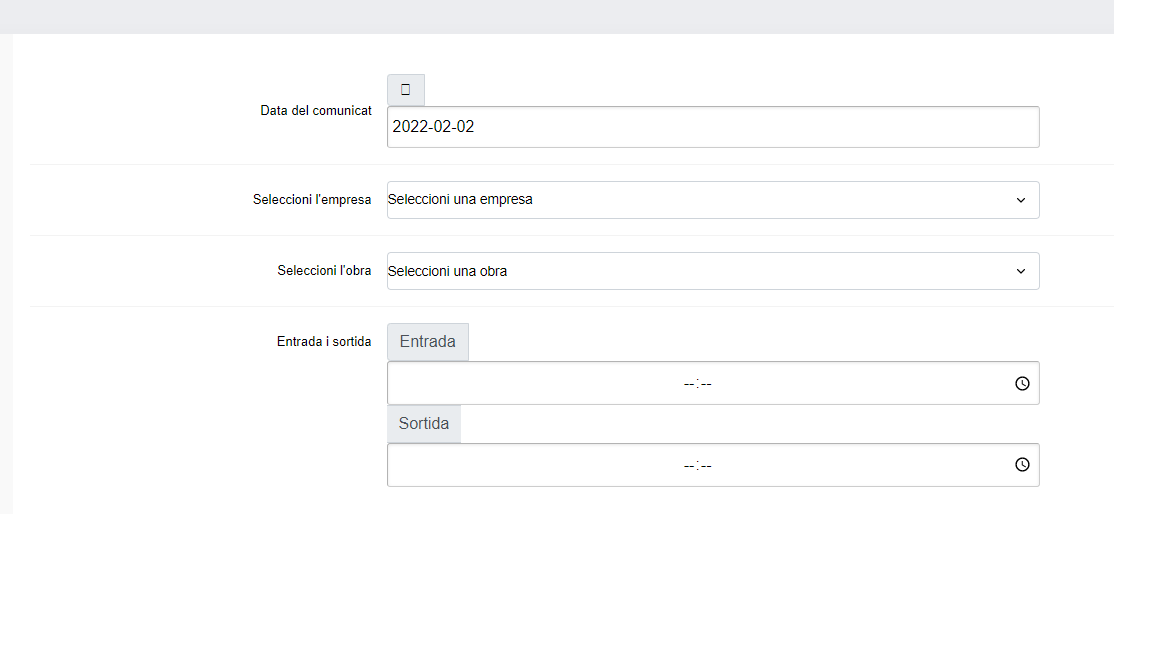
I assume you mean font awesome icons plus other CSS styles? If yes, there is something broken with 6.1 because it tries to inject its own code that overwrites your website styles. Not sure why the developers decided that was a great idea ?
The solution is to revert the file back to how it was on version 6.0.x
Overwrite your file in: /themes/ee/cform/eecms-cform.min.css
With the following code: https://pastebin.com/2Ek8gc5u
Perfect, thanks for your contribution, replacing the .css file the screen is already displayed correctly.

The issue is that this code will probably overwritten with each EE update in the future. As officially, I don’t think they acknowledged this as a bug.
Ok, thank you very much for your contribution.