

Remove formatting tags from title tag
How Do I?

Our blog often references publications, works of art, or other titles which require the <cite> tag in the headline. How can I omit these formatting tags from the automatically generated <title> for the head element of the page?
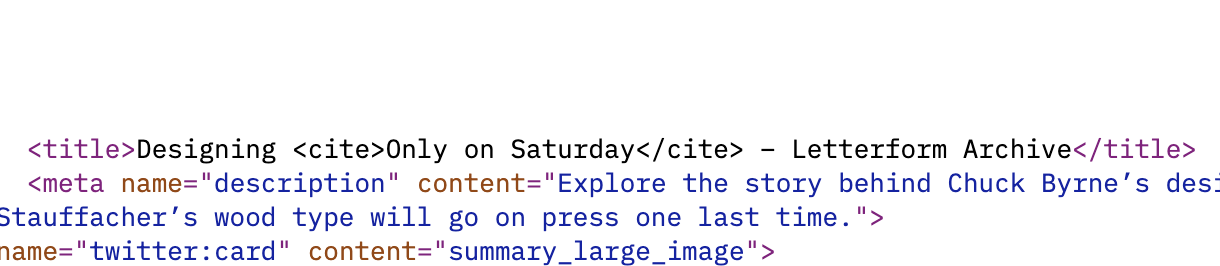

In cases like this I’d always use a different field to replace the normal Title value where necessary.

if you need the same field for this, can use a custom plugin with php str_replace function
for example
public function replacedata(){
  $this->buscartxt = (ee()->TMPL->fetch_param('buscartxt'))?ee()->TMPL->fetch_param('buscartxt'):0;
  $this->reemplazatxt = (ee()->TMPL->fetch_param('reemplazatxt'))?ee()->TMPL->fetch_param('reemplazatxt'):0;
  $formtag = str_replace($this->buscartxt, $this->reemplazatxt, ee()->TMPL->tagdata);

  return  $formtag;

 }
and use in your template
<title>{exp:tcdcl_utilities:replacedata buscartxt="<cite>" reemplazatxt="" }{title}{/exp:tcdcl_utilities:getGridValues}</title>tcdcl_utilities are the name of yur custom Plugin and replacedata the name of function
this replace only open tag cite , but you can custmize the function its only a simple example.

Update the code to generate a clean and formatted title without the tags. For example, if you are using JavaScript, you can use the replace() method to remove the tags. Here’s an example:
javascript Copy var title = “Your Title with <cite>Formatting”; var cleanTitle = title.replace(/<\/?cite>/gi, ”); document.title = cleanTitle; In the example above, the replace() method is used with a regular expression /<\/?cite>/gi to globally remove and tags from the title variable. The clean title is then assigned to the document.title property.
By modifying the code that generates the <title> tag in this way, you can ensure that the automatically generated title for the <head> element of your blog’s page does not include the <cite> tags. This will result in a clean and properly formatted title that doesn’t interfere with the display or functionality of your uno online blog.