ExpressionEngine CMS
Open, Free, Amazing

Thread

This is an archived forum and the content is probably no longer relevant, but is provided here for posterity.

The active forums are here.

Can't upload ANY images to forum/threads

March 27, 2008 5:22pm

Subscribe [4]
  • #16 / Mar 28, 2008 3:18pm

    Derek Jones

    7561 posts

    Odd, since PHP Info is listing “bundled (2.0.28 compatible)”.  At this point I would recommend contacting your server admin, as it appears that the GD 2 lib is not installed properly or working as it should be.  Same with ImageMagick - if it’s installed properly and you have added the server path to ImageMagick in the Image Resizing Prefs, it should have worked like a charm.

    Did you get any errors when you tried it with ImageMagick?  And is display_errors enabled (check PHP Info) and your output and debugging preferences in ExpressionEngine set to display errors to Super Admins?
  • #17 / Mar 28, 2008 3:31pm

    TrippAllen

    21 posts

    Unfortunately/fortunately, the server admin is me.

    I updated the GD lib and restarted the httpd service.  Still nada.

    I did add the server path to ImageMagick after installing it but without luck.


    I turned on display_errors and receive a generic error message when attempting to display the photo in the pop-up window (no errors displayed for thumbnail).  Below is an example of the error that is popped up.

    The image “http://www.unionsportsmen.org/index.php?ACT=25&fid=40&aid=57_xUEApz3PWnldk3pRBMKz&board_id=1” cannot be displayed, because it contains errors.

  • #18 / Mar 28, 2008 3:41pm

    Derek Jones

    7561 posts

    Unfortunately that’s not a PHP error, so doesn’t give us any more clues.  What happened when you switched to ImageMagick?  And can you confirm that ImageMagick works from the command line after installing?  We’re treading into server setup here, which is something we really can’t provide support for, but I’m willing to help you as best as I can.

  • #19 / Mar 28, 2008 4:55pm

    TrippAllen

    21 posts

    I certainly appreciate your help Derek.


    Switching to ImageMagick seemed to have no results nor differences from using GD.

    I’d like to confirm that it’s working, but am unsure the best way to confirm that via command line.  I have access to the shell, I simply don’t know how to test ImageMagick from within it.

  • #20 / Mar 28, 2008 5:19pm

    Derek Jones

    7561 posts

    So ImageMagick works, but still leaves the corrupted images?  I don’t suppose you have another server, maybe even on a different network that you have EE installed on to compare?  I mean, it’s working here, and this is the first occurrence I recall seeing this behavior reported by a user, but I’m afraid I’m not entirely sure what could be the underlying issue.

    You could try:

    /path/to/imagemagick/convert -quality 90 -resize 400x300 source.jpg dest.jpg 2>&1

  • #21 / Jun 17, 2008 4:05pm

    trcpusa

    29 posts

    I can’t (nor can anyone) upload any image to a forum thread on our site (http://www.unionsportsmen.org). We have tried small image, large images, jpgs, gifs, png, bmp, etc

    when you go to reply to a thread or start a new topic, the button for the attachment is at the bottom - you click attach, select your image, and it attaches - but when you post you continually get a red [x]

    What am I doing wrong? Is there a setting somewhere to allow it or is this a code error?

    thank you

  • #22 / Jun 17, 2008 4:18pm

    Ingmar

    29245 posts

    Do you have a link to the site, where we can see that behavior for ourselves?

  • #23 / Jun 17, 2008 4:24pm

    trcpusa

    29 posts

    Hello -

    My login is: jallen and the pw is: XXXX…located at http://www.unionsportsmen.org

    thank you

    julia

    also - can you cc my email as well as my bosses (which is how I am logged in here? .(JavaScript must be enabled to view this email address)) thank you again

    Moderator’s note: Edited out password for security reasons.

  • #24 / Jun 17, 2008 5:16pm

    Ingmar

    29245 posts

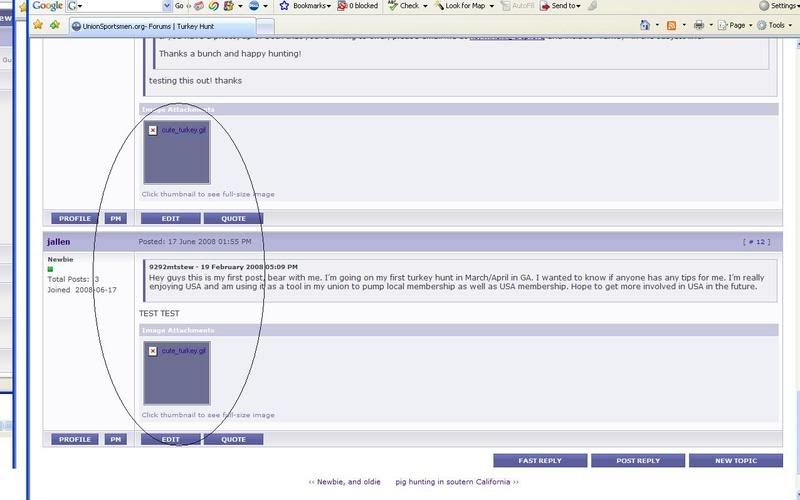
    trcpusa, when you say “red x”, what exactly do you mean? A missing image? If so, can you show this to me in a forum thread? If it doesn’t show on a public site, could you post a screen-shot showing the error?

  • #25 / Jun 17, 2008 6:02pm

    trcpusa

    29 posts

    trcpusa, when you say “red x”, what exactly do you mean? A missing image? If so, can you show this to me in a forum thread? If it doesn’t show on a public site, could you post a screen-shot showing the error?


    ——————-

    Hello -

    I have attached a screenshot of the red x. The last image (3.jpg) shows the red [x] for the missing image, but I never get a file size error etc - it simply won’t upload properly…and just to repeat I have tried various sizes and file endings but nothing works

    http://i41.photobucket.com/albums/e288/yayjulia/3.jpg

    thank you
    julia

  • #26 / Jun 17, 2008 6:10pm

    Ingmar

    29245 posts

    OK, so this is a forum issue, right? You are trying to attach an image to a forum posting?

  • #27 / Jun 17, 2008 6:47pm

    trcpusa

    29 posts

    OK, so this is a forum issue, right? You are trying to attach an image to a forum posting?

    ——

    yes in the forums, we should be able to have our members upload pictures to it for everyone to see

    thanks

    julia

  • #28 / Jun 18, 2008 11:24am

    Robin Sowell

    13255 posts

    I registered and poked around a bit- would like to upload a test image.  But it’s a live site- so want to confirm w/you it’s ok.  Might upload a quick one to the lounge and then delete it.  Is that ok?

  • #29 / Jun 18, 2008 12:11pm

    trcpusa

    29 posts

    hello Robin -

    Yes, that is fine. I appreciate your help! Our members are becoming quite peeved

    thank you

    Julia

  • #30 / Jun 18, 2008 12:29pm

    Robin Sowell

    13255 posts

    OK- that’s extremely odd.  Can you upload images ok via the publish page?  Or the gallery?

.(JavaScript must be enabled to view this email address)

ExpressionEngine News!

#eecms, #events, #releases