

MODULE: Email / Contact Form: how to insert "name"and "from" into message body
How Do I?

Hello, I am struggling to get the email address included in the message that has been sent through the Email Contact Form Module.
Since I am forced to use replyto=”yes” as my email provider will not send an email with an address that is not from its domain. So in the end I am not able to reply to the sender. Therefore I would like to include name and from in the top of the message.
Thanks in advance!

Essit,
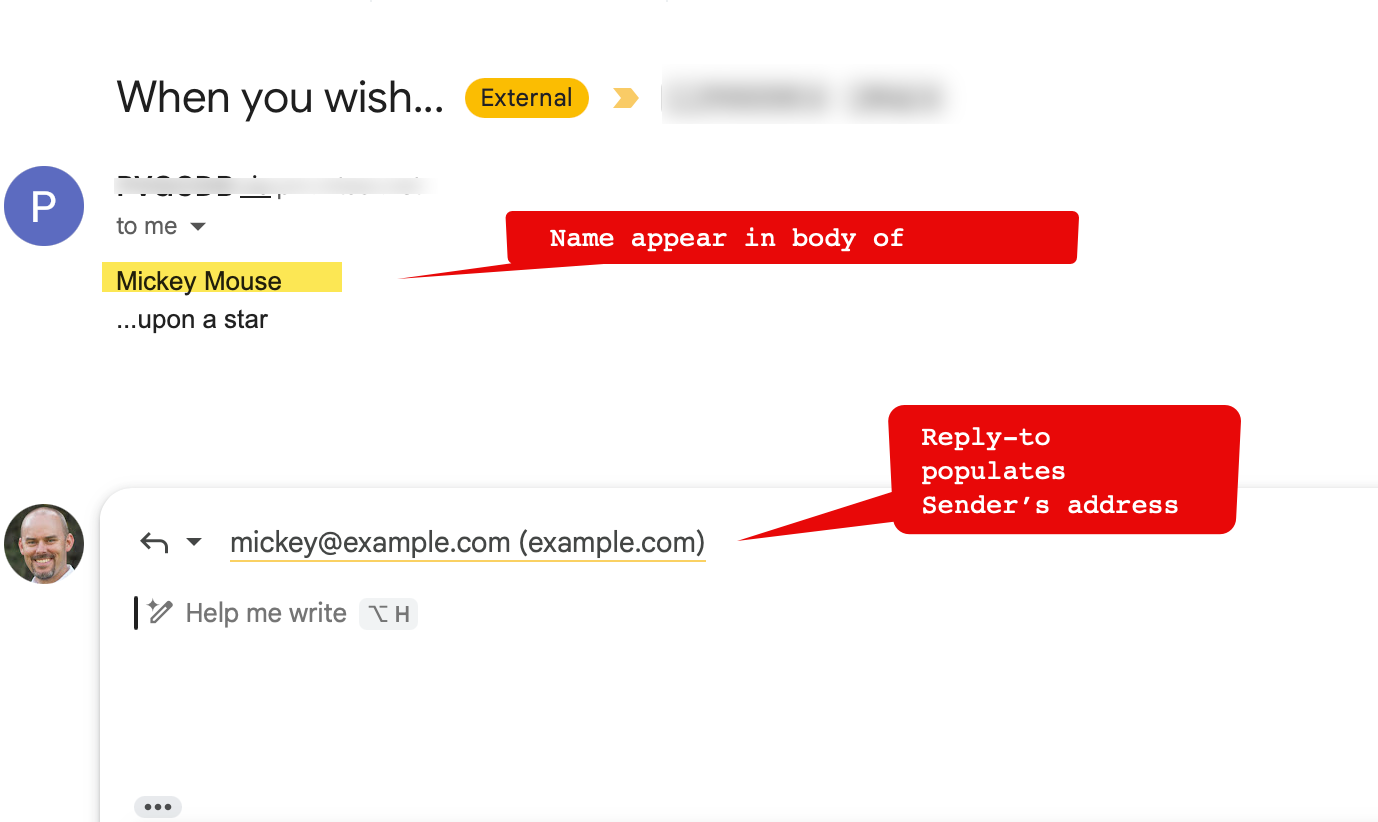
With the code below, the EE contact form sends a message to my inbox, and in reply-to header properly has the user’s address. So if I reply to the email, it pre-populates that email as I would expect.
{exp:email:contact_form replyto="yes"
   form_class='contact-form'
   return='{site_url}index.php/{p_url}/thanks' redirect='0'
    recipients="[email protected]

   }
   <fieldset class="row">
    <section class="w-4 instruct">
     <label>Name</label>
     <em>What do you want to be called?</em>
    </section>
    <section class="w-12 field">
     <input name="message[]" type="text" value="">
    </section>
   </fieldset>
   <fieldset class="row">
    <section class="w-4 instruct">
     <label>Email <span class="required">✱</span></label>
     <em>How do we contact you?</em>
    </section>
    <section class="w-12 field">
     <input class="required" name="from" type="text" value="{member_email}">
    </section>
   </fieldset>
   <fieldset class="row">
    <section class="w-4 instruct">
     <label>Subject</label>
     <em>What did you want to discuss?</em>
    </section>
    <section class="w-12 field">
     <input name="subject" type="text" value="">
    </section>
   </fieldset>
   <fieldset class="row">
    <section class="w-4 instruct">
     <label>Message <span class="required">✱</span></label>
     <em>Please keep it kind, brief and courteous.</em>
    </section>
    <section class="w-12 field">
     <textarea class="required" name="message[]" cols="" rows="8"></textarea>
    </section>
   </fieldset>
   <fieldset class="ctrls">
    <input class="btn" type="submit" value="Send e-mail">
   </fieldset>


  {/exp:email:contact_form}
Note this very subtle trick:
<section class="w-4 instruct">
     <label>Name</label>
     <em>What do you want to be called?</em>
    </section>
<section class="w-12 field">
     <input name="message[]" type="text" value="">
    </section>
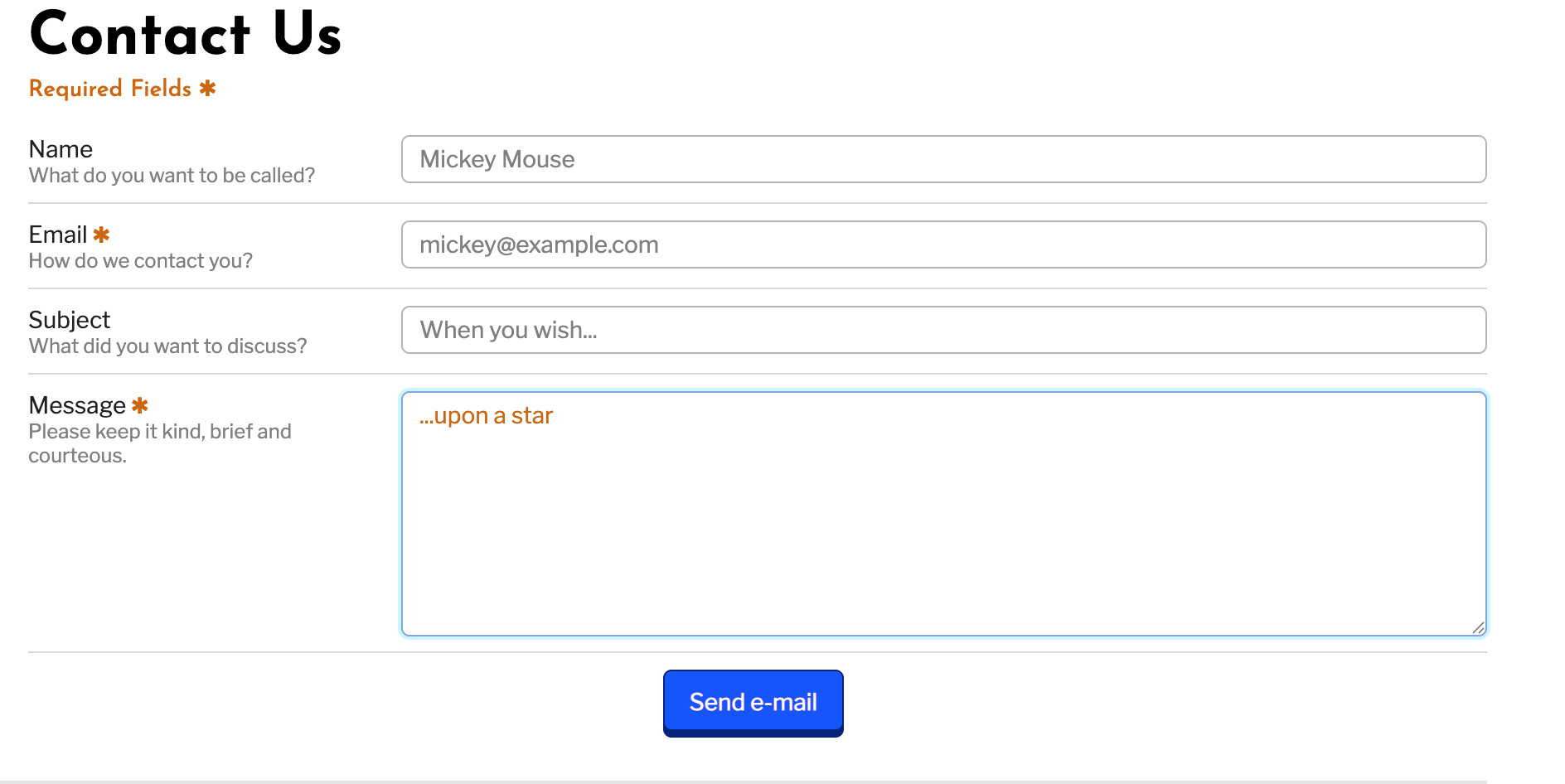
The input field for ‘Name,’ <input name=”message[]” type=”text” value=”“> specifies the message[] array, so the name ‘Mickey Mouse’ gets appended to the body of the message along with the conventional message that is sent.
Quick followup.
I’ve attached screenshots of how my email form looks, along with the actual email submission.
Creativearc,
Thank you for your help and clear explanation. I have managed to get the name into the message body of the email. But somehow the reply-to doesn’t populates the sender’s address, instead it populates my email address.
{exp:email:contact_form user_recipients="no"
replyto="yes" recipients="[email protected]"
charset="utf-8" redirect="return" return="contact/thanks"}
       <table class="tableless">
        {if captcha}
        {captcha}
 <input type="text" name="captcha" value="" maxlength="20" /></p>
        <div class="message notice">
            <em class="icon-warning-sign"></em> Please enter the word you see in the image above.
           </div>
        <hr>
        {/if}

        <tr><td><input type="text" name="message[]" size="40" value="" placeholder="Name" /></tr></td>
        <tr><td><input type="text" id="from" name="from" size="40" value="" maxlength="35" placeholder="Email" />
        <tr><td><input type="text" id="subject" name="subject" size="50" value="" placeholder="Subject" /></td></tr>
        <tr><td><textarea id="message" name="message[]" rows="18" cols="40" value="" placeholder="Message"></textarea></td></tr>
        <tr><td><input name="submit" type='submit' value='Send' /></td></tr>
       </table>
       {/exp:email:contact_form}
Is it possible to add the email address into the message body?
From the docs:
replyto="yes":By default the email address sending the email will be put in the From header for the email. If this parameter is set to “yes”, then that email address will be put into the Reply-To field and the site’s webmaster email will be put in the From header. This is necessary at times because certain email servers will not send an email with an address not from its domain, so ExpressionEngine will use the site’s webmaster email address to get past this restriction while still allowing any replies to go to the sender of the email.
So it seems you are doing it right.
a) What happens if you remove the parameter:
user_recipients = no?
b) What happens if you temporarily clone my form code (adjusting recipient values but nothing else?)
I have removed user_recipients=”no” and that doesn’t change.
With your first reply on my question I already copied your code and only thing I changed was recipients, and unfortunately no success.

I’m not seeing a way in the code that reply_to wouldn’t end up sending. It uses this logic:
if (isset($_POST['replyto']) && $_POST['replyto'] == 'yes') {
                    ee()->email->from(ee()->config->item('webmaster_email'), ee()->config->item('webmaster_name'));
                    ee()->email->reply_to($_POST['from'], $_POST['name']);
                } else {
                    ee()->email->from($_POST['from'], $_POST['name']);
                }
And it should boot the email out if there is no from sent. I might turn on browser debug and just make sure the ‘from’ is what is intended. But unless there’s an extension in play or maybe it is sending it but some weird email server thing loses it, I don’t see how it fails with replyto set to yes.
I got it sorted now. I ended up in uninstalling the Email Module, clearing cache and then reinstalling the Email Module. Now the reply-to is populated correctly with the email as filled in the id=”from” of the contact form.