

SOLVED - PNG Transparency Manipulation
News and General

I know EE uses the GD library for resizing, but has someone noticed any issues while processing PNG images? Not sure if this same issue with my server library, but it seems to heavy dislike transparent PNG images. It adds its own background to images instead of keeping the transparency settings.

@vw000 check out this thread from Slack and see if it helps: https://eecms.slack.com/archives/C04CUNNR9/p1644877576973359 (screenshot below in case the data in Slack disappears)
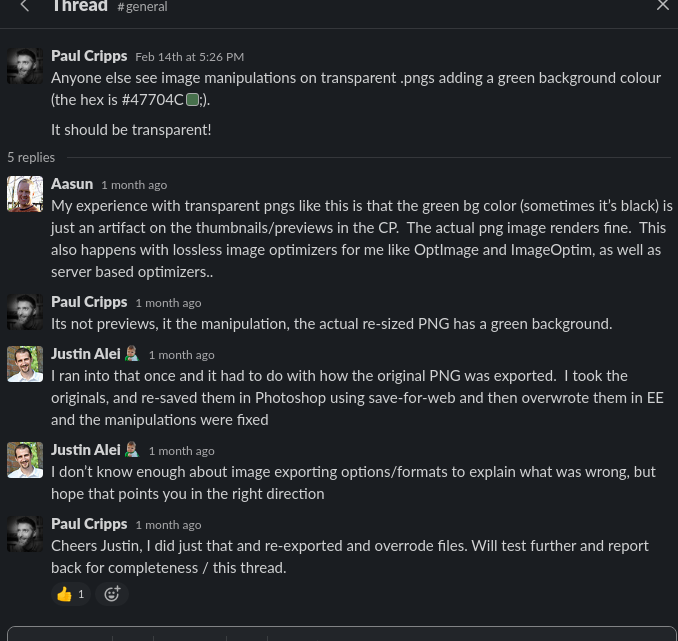
Thanks, Andy, that is exactly the issue I had. A green background with transparency, but other images are fine. Was not able to re-create the issue, just like the comments on Slack. I guess it’s not related to EE if it’s happening with other image manipulation libraries as well but more to the format of the PNG image.
I also noticed the following. EE manipulates the original image on upload.
Example:
You upload a 1024x1024 image and decide to create 2 smaller thumbnail versions.
The conversion for some reasons changes the original image as well. This is bad because in my case the manipulation has 2 effects.
My original image is sharp and optimized. After I upload to EE, it quadruples in size and all the text is now blurry in my screenshot.
A 50 KB PNG file turns into 300 KB after uploading to EE, and looks like some blur filter or something else which decreases quality. It looks like a heavily compressed image, but from the size it’s the opposite. It’s huge. Instead of compressing the images, EE blows it up in size and decreases quality.
The smaller images are converted to the proper sizes correctly from the original, but also big for their sizes. I don’t mind them being big as I can re-optimize them, but messing the original file is a bit concerning. I want EE to make a conversion and manipulate the image, but don’t touch the original file uploaded.
I understand if the manipulated images don’t look as well, but why is it messing with my original file as well? I think a temporary image should be used for manipulations which is then deleted and never touch the original image uploaded.