

Channel Forms: Creating Different Inputs Fields for Different Category Groups
How Do I?

So I have a channel form for editing Entries. There are two different categories assigned to the channel: Department (category_groups ID 12) VLANs (category_groups ID 6)
I want the user to select a category from different Select lists.
In the channel form I have the following code:
        {category_menu show_group="12"}
        Department
        <select name="category[]" id="categories" size="4" multiple="multiple">
          {select_options}
        </select>
        {/category_menu}


        {category_menu show_group="6"}
        Vlans
        <select name="category[]" id="categories" size="4" multiple="multiple">
          {select_options}
        </select>
        {/category_menu}
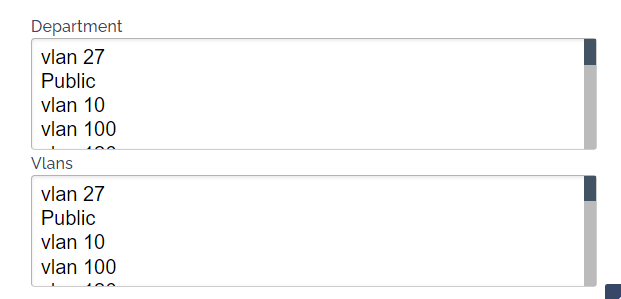
When the Page is loaded both the above select menus are populated with the Last Category Group to load options, in this case, VLANS group6
I feel I must be missing something very obvious.
Any Ideas. I attached a screenshot of how the template loads

Have you tried using the plain {categories}{/categories} tag pair instead of {category_menu}{/category_menu} ?
Hi, thanks for the reply but {categories}{/categories} pair seem don’t work in Channel Forms at all. They seem to only be for Channel Entries

Just a thought, but sometimes when dealing with Categories a gotcha is that if you have no entries assigned to a category, it doesn’t show. From memory neither does the group if no entries are assigned to that group.
This has bitten me numerous times when developing new functionality.
@seavers Thanks I will try that and let you know.
Unfortunately, that has had no impact. The Channel form still parses both input fields with the last Coded category group. So odd.
So it seems to be an issues with the Multiselect list input field. This format checkbox works:
        <h5>Department Category</h5>
        {categories show_group="6"}
          <input type="checkbox" name="category[]" id="{category_name}" value="{category_id}"{checked}> {category_name}<br>
        {/categories}
        <h5>Vlan Category</h5>
        {categories show_group="12"}
          <input type="checkbox" name="category[]" id="{category_name}" value="{category_id}"{checked}> {category_name}<br>
        {/categories}