We use cookies to improve your experience. No personal information is gathered and we don't serve ads. Cookies Policy.

ExpressionEngine Logo ExpressionEngine
Features Pricing Support Find A Developer
Partners Upgrades
Blog Add-Ons Learn
Docs Forums University
Log In or Sign Up
Log In Sign Up
ExpressionEngine Logo
Features Pro new Support Find A Developer
Partners Upgrades
Blog Add-Ons Learn
Docs Forums University Blog
  • Home
  • Add-Ons
default app icon

Field Usage Info

By Imam Husayn
Utilities
Visit
Description

It provides the channel list for the specific field.

It provides the channel list for the specific field.
Features

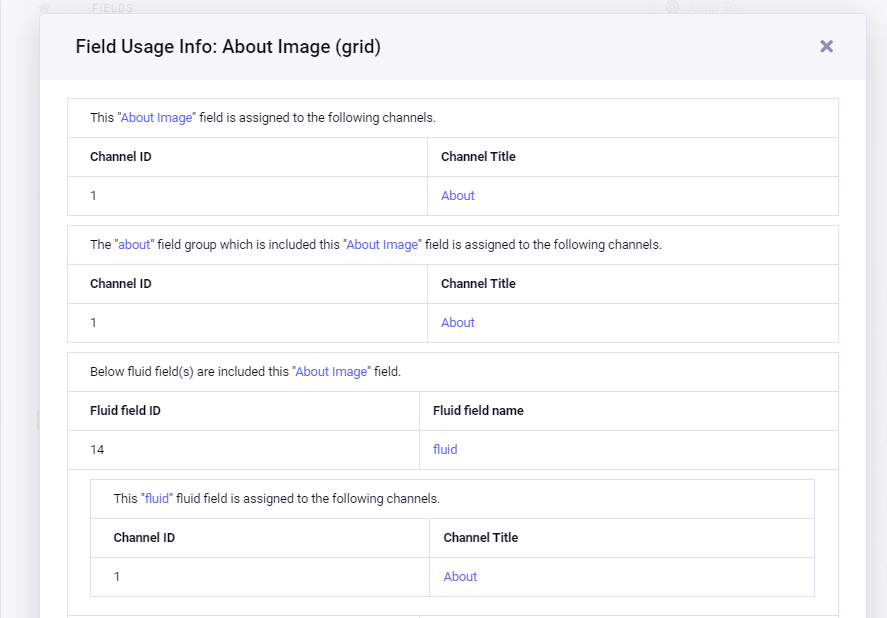
  • It provides the channel list for the specific field on the channel field page of the CP. No need to navigate the add-on page.
  • It provides the information of the field group if the specific field is included in it and provides the channel list where that field group is assigned.
  • It provides the fluid field if the specific field is included in it and provides the channel list where that fluid field is assigned.

How to use it?

When you open the channel field list page then you can found the button “Field Usage Info” for all the fields. When you click on the “Field Usage Info” button then one popup box will be opened the detail where that field is used in the channel.

Information
Version 1.0.2
Last Update 4 years ago
Compatibility EE 7, 6
License Apache
Links
  • Documentation
  • Support
Visit
ExpressionEngine Home Features Pro Contact Version Support
Learn Docs University Forums
Resources Support Add-Ons Partners Blog
Privacy Terms Trademark Use License

Packet Tide owns and develops ExpressionEngine. © Packet Tide, All Rights Reserved.