@Jamongkad
If you use mode_rewrite you .htaccess file should look like the following
<IfModule mod_rewrite.c>
RewriteEngine on
RewriteCond $1 !^(index\.php|public|fonts|robots\.txt)
RewriteRule ^(.*)$ index.php/$1 [L]
</IfModule>
Dan
This is an archived forum and the content is probably no longer relevant, but is provided here for posterity.
The active forums are here.
July 17, 2007 1:14pm
Subscribe [65]#31 / Jul 29, 2007 7:46pm
@Jamongkad
If you use mode_rewrite you .htaccess file should look like the following
<IfModule mod_rewrite.c>
RewriteEngine on
RewriteCond $1 !^(index\.php|public|fonts|robots\.txt)
RewriteRule ^(.*)$ index.php/$1 [L]
</IfModule>Dan
#32 / Jul 29, 2007 7:55pm
I have short question about FreakAuth’s otutgoing mails. FreakAuth seems to automatically add “<” and “>” around the email address. This is ALSO done by CodeIgniter’s default email library. This gives me the following error:
SMTP server response: 554 5.7.1 Sender address format `<<[email protected]>>’ not RFC-compliant
And just I can’t find where FreakAuth is adding this! Can anybody help?
No idea, I tested FAL 1.1 with last CI 1.5.4 and everything worked fine.
#33 / Jul 29, 2007 8:09pm
Hi guys
I think FreakAuth is an excellent addition to CodeIgniter and it saved me a lot of time. It’s really quite easy to install, use and adapt. What I didn’t achieve is to display the login form in my content div of one of my views. Is this possible? If I have a particular page that should be secured I want to show the login form on this page in the content div so that it shows the header, navigation and all. Now I just adapted the templates so that everything shows adapted to my design, except for the navigation. If it’s not possible, it’s not a big problem either. The backend of FreakAuth is also very useful and makes a good starting point for a cms backend.
So thanks a lot for your work. I donated 10 Euro, it’s not much but better than nothing.
Cheers
maesk
Cheers Maesk for the donation by me and Chris (aka grahack - he is in holydays now so don’t blame him for low activity in the forum!).
About your question:
You have 2 ways:
a) use the helper function displayLoginForm() in your view
b) this is better in my opinion, use the fal_front method in your controller.
<?php

class YourController extends Controller
{
    /**
     * Initialises the controller
     *
     */
    function YourController()
    {
        parent::Controller();

        $this->load->library('FAL_front', 'fal_front');

        $this->_container = $this->config->item('FAL_template_dir').'template/YOURcontainer';
    }

    // --------------------------------------------------------------------

    /**
     * Displays the login form.
     *
     */
    function index()
    {
        $this->login();
    }

    // --------------------------------------------------------------------

    /**
     * Displays the login form.
     *
     */
    function login() //you can change the action name
    {
        $data['fal'] = $this->fal_front->login();
        $this->load->view($this->_container, $data);
    }
Speaking about method b) take as example the auth.php controller and read this tutorial:
- I don’t like that “auth.php” controller!
Hope this helps!
Dan
#34 / Jul 31, 2007 12:50pm
@DanFreak
Thanks I already fixed my “image” problem. Oh I was reading up on your Custom Userprofile part two and I seem to run into a snag. Most particularly the “view.php”
Userprofile for user
A PHP Error was encountered
Severity: Notice

Message: Undefined variable: user

Filename: app/view.php

Line Number: 1


A PHP Error was encountered
Severity: Notice

Message: Undefined variable: user

Filename: app/view.php

Line Number: 3

EDIT

username:
A PHP Error was encountered
Severity: Notice

Message: Undefined variable: user

Filename: app/view.php

Line Number: 6

e-mail:
A PHP Error was encountered
Severity: Notice

Message: Undefined variable: user

Filename: app/view.php

Line Number: 7

no data in DB: please add them
Now as far as I can tell PHP is telling me it can’t place the data into the variables cuz there’s no DB to connect to. I did everything that needs to be done in the Myaccount controller as far as the tutorial was concerned. My question is do I have to query the database for this? cuz I tried doing that to no avail…
#35 / Jul 31, 2007 12:55pm
@DanFreak
Now as far as I can tell PHP is telling me it can’t place the data into the variables cuz there’s no DB to connect to. I did everything that needs to be done in the Myaccount controller as far as the tutorial was concerned. My question is do I have to query the data for this? cuz I tried doing that to no avail…
PHP is simply telling you that you didn’t pass data to the view for the variable $user.
do you have data in your DB?
Dan
#36 / Jul 31, 2007 1:30pm
@DanFreak
Now as far as I can tell PHP is telling me it can’t place the data into the variables cuz there’s no DB to connect to. I did everything that needs to be done in the Myaccount controller as far as the tutorial was concerned. My question is do I have to query the data for this? cuz I tried doing that to no avail…
PHP is simply telling you that you didn’t pass data to the view for the variable $user.
do you have data in your DB?
Dan
Thanks I already solved the problem. The array $data was conflicting with my custom template system. Your original code had the the $data array already covered, incidentally my template system uses $data as well. PHP couldn’t tell the difference! so I had to refactor your code in order for it to work on my end hahaha.
Nice fast feedback I love the way you guys handle this keep up the good work!
#37 / Jul 31, 2007 1:39pm
Thanks Dan!
Since my application is running pretty well now and already tested I don’t want to change all my controllers now, and besides: I DO like that auth.php controller 😉
But it’s good to know how it can be done and I will do it with method b) for my next application.
I’m still very pleased with FAL!
maesk
#38 / Jul 31, 2007 1:53pm
I’m happy you guys like FAL (= mine and grahack sweat)!
😉
@Jamongkad
cool, so we know that the userprofile tutorial still works for FAL 1.1
@maesk
Super! so next time you have multiple solutions!
Have a nice evening guys!
Dan
#39 / Jul 31, 2007 2:37pm
@DanFreak
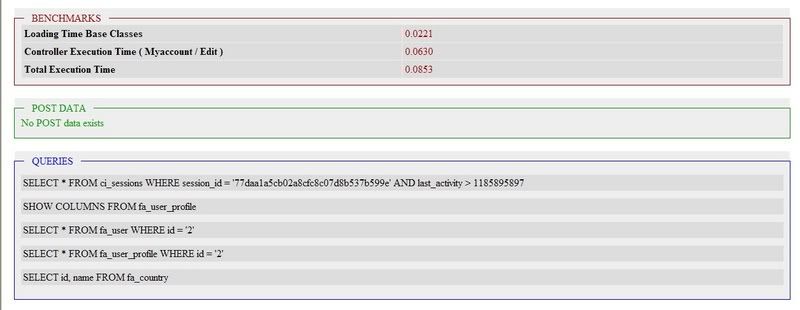
Since we’re in the process of fine tuning Fal I would like to introduce another niggle hehe. Once I got the myaccount/edit controler/method working. CI seems to spout out a strange but interesting error.
Parse error: syntax error, unexpected '"', expecting T_STRING or T_VARIABLE or T_NUM_STRING in C:\wamp\www\myswebsite\system\libraries\Profiler.php on line 169Upon inspection of this of Profiler.php line 169
It seems line 168 was commented out to make room for line 169. So as an experiment decided to comment out line 169 as well and lo and behold it worked! but there was this weird benchmark result that comes out of the bottom of the edit form..
please click on link below(sorry I don’t know how does this forum display images).
http://i8.photobucket.com/albums/a21/jamongkad/error.jpg
#40 / Jul 31, 2007 2:42pm
@Jamongkad
This is a CI problem. I’m aware about a Profiler problem in CI 1.5.3, not sure about CI 1.5.4.
Report it to the CI guys.
Dan
#41 / Jul 31, 2007 2:54pm
@Jamongkad
This is a CI problem. I’m aware about a Profiler problem in CI 1.5.3, not sure about CI 1.5.4.
Report it to the CI guys.
Dan
Ok will do
#42 / Aug 01, 2007 11:26am
Hi again guys,
Last week i got some kind of revelation and everythings start to be clear, maybe just a question of experience and time 😊
Now i understand pretty much what is going on and HOW use FAL no matter if i’m a newbie or not 😉
Two little question :
1.
I read the tutorial about profile, how do i deal with something like i have a field in the profile database, like SECRET_INTERN_SERIAL_NO, so the user will never see this field, but i have to rely this on the user profile.
So on the registration and edit profile or account i didn’t need to show it to the basic user, is there a way to put this field hidden ? to prevent being edited on some transaction ? What you guy do to achieve this ?
2.
Security : What is the overall process to prevent session hi-jacking, could you make me a little history about what FAL do for us about security. I’ll be happy to learn from this.
Many thanks.
#43 / Aug 01, 2007 12:34pm
@pb30
yes it is possible to use the captcha in other stuff.check out how we used it in FAL_front.php
$fields['security'] = $this->CI->lang->line('FAL_captcha_label');
$rules['security'] = $this->CI->config->item('FAL_user_captcha_field_validation');

......

$action='_login';
$this->CI->freakauth_light->captcha_init($action);
$data['captcha'] = $this->CI->config->item('FAL_captcha_image');
in your view<label for="security"><?=$this->lang->line('FAL_captcha_label')?>:</label> <?=form_input(array('name'=>'security', 'id'=>'security', 'maxlength'=>'45', 'size'=>'45', 'value'=>''))?> <?=(isset($this->fal_validation) ? $this->fal_validation->{'security'.'_error'} : '')?> <?=$this->load->view($this->config->item('FAL_captcha_img_tag_view'), null, true)?>the captcha template is in views/FreakAuth_light/content/forms/html_for_captcha.php
I’ve managed to get the captcha to display but I cant figure out the validation. Any ideas?
#44 / Aug 03, 2007 10:01am
I want to have a login nugget on every page but in the controller I need to do something like this,
function register()
    {
    ...
    $data['fal'] = $this->fal_front->register();
    ...
    }
so how can I ‘enable’ the login nugget by also setting,
$data['fal'] = $this->fal_front->login();#45 / Aug 04, 2007 7:39am
Hi guys, great work on FreakAuth, it is just what I was looking for.
I have a small issue which is probably something that I have overlooked but havent had any success after a few hours…
After setting up FreakAuth using the installation instructions, Iam not able to view any other page except ‘home’ and ‘examples’. If I click on ‘login’, ‘register’, etc, the page will behave as if it is loading but it will just appear blank, nothing comes up.
Your help is greatly appreciated.
—MK
EDIT:
——-
I have narrowed down the problem after many hours :lol:
the problem is that the server doesn’t like the use of CAPTCHA’s…
I was initially testing FreakAuth on a UNIX based setup of PHP/Apache and had the blank page problem as above, then tried it on a WAMP setup and it worked perfectly, so I compared the phpinfo() of both servers and the WAMP server had more GD stuff such as freetype etc (I was lead to find this from the image_lib problem that was mentioned in the other thread).
I turned off CAPTCHA’s using the config file (freakauth_lite.php) and the pages now load on the UNIX server. I did try re-configuring and installing php using—with-ttf in the ./configure line but still blank pages appear when Im trying to use CAPTCHAs.
What can I do?