ExpressionEngine CMS
Open, Free, Amazing

Thread

This is an archived forum and the content is probably no longer relevant, but is provided here for posterity.

The active forums are here.

301 redirect methods/reccomendations for EE2 MSM

September 28, 2011 4:18am

Subscribe [3]
  • #1 / Sep 28, 2011 4:18am

    rknelson

    5 posts

    Hello,

    I did it.  I renamed the template group, and now I would like to redirect the old rankings to the new template locations.  I am using MSM, but the template rename only affects a single site.

    I am having problems making this happen.  Below is the methods I have attempted to use to solve this problem. And the output that I have received.  If anyone knows of a “detour” like plug in for EE2 and MSM please stop reading and let me know.

    #1 Search DEVOT:EE for addon’s found several cool ones, but not any that worked for EE2 running MSM for doing 301 redirects


    #2 Mess around attempting to perform mod-rewrites I attempted to to modify it but i could never get it to redirect a page.  I suspect that this is because EE is doing something fancy i don’t understand.

    #3 I found a site where they set up a blank template under the old template group and via a channels entry tag pair attempted to redirect.  I had to convert it over from EE 1 so i might have messed something up there. but I could not get it to work.

    #4 After researching how EE treats URL’s I came across

    http://www.jamessmith.co.uk/images/ExpressionEngine_url_schematic.png
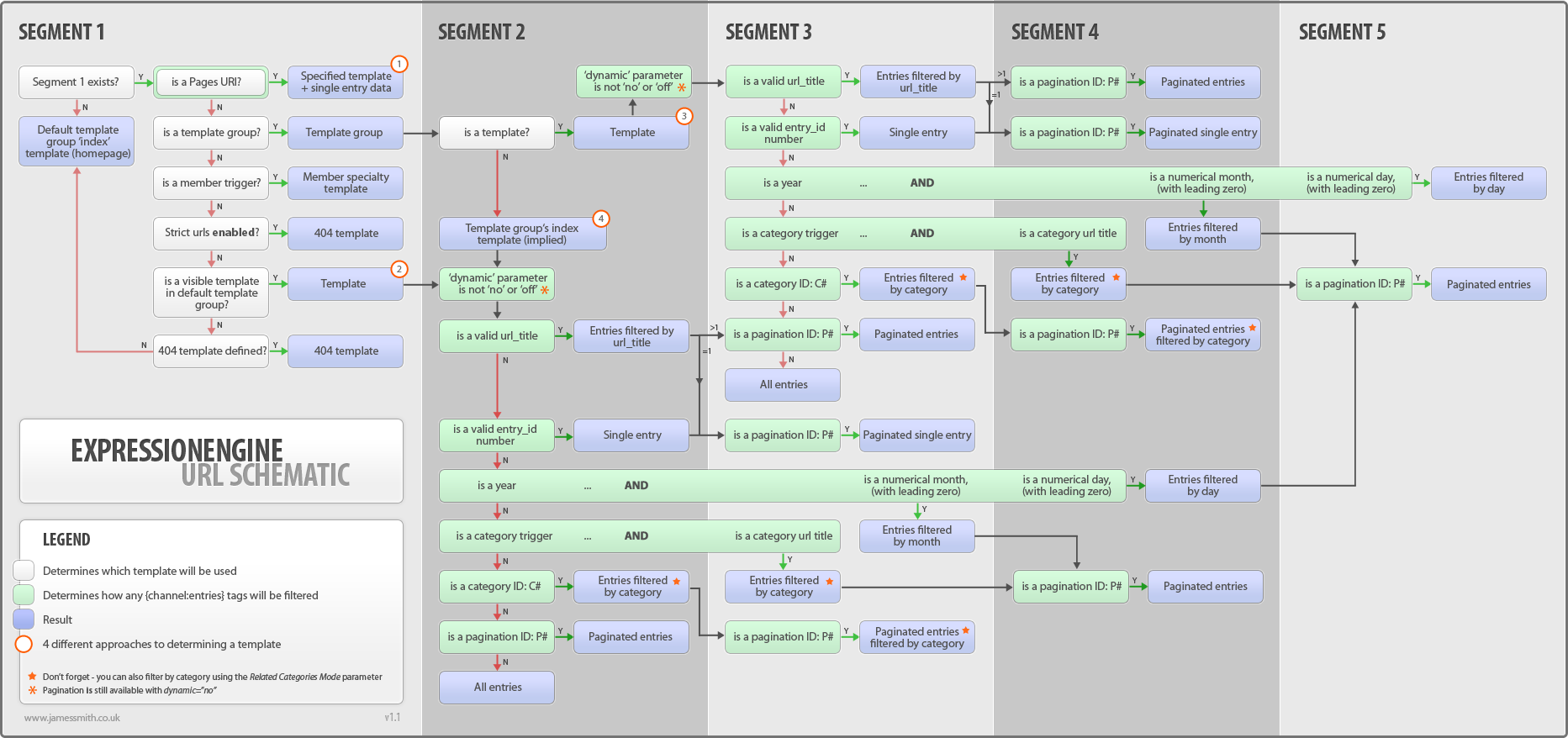
    Which I found very interesting, it made me think to enforce strict URL’s and push 404’s or another page but even that would be better than what I am getting currently the homepage with out any CSS or images. I tried enabling strict URL’s and selecting the home page as the redirect point but the home page redirect still was mis formatted and picture-less.  strict with out a page does 404 but that is not a good solution either.


    Any recommendations, it seems like i am way over thinking this.  Thanks

    Rob

  • #2 / Sep 28, 2011 5:31pm

    Dan Decker

    7338 posts

    Hi Rob,

    If I’m reading correctly, you are dealing with 2 issues at the moment? You want a method to handle 301 redirection as well as having some issues with you CSS, is this correct?

    For 301 redirection, you can use .htaccess directives to handle this. Here is a tutorial. Essentially, you create a .htaccess file at the web-root with a 301 directive for each affected URL. For example:

    redirect 301 /old/url <a href="http://www.example.com/new/url">http://www.example.com/new/url</a>
    redirect 301 /old/url2 <a href="http://www.example.com/new/url2">http://www.example.com/new/url2</a>

    Place each directive on a new line, 1 for each affected URL.

    Now, what seems to be the issue you are having with CSS?

    Cheers,

  • #3 / Sep 30, 2011 1:40am

    rknelson

    5 posts

    Dan,

    Thank you for your help.  With a days fresh start and your example.  I realized my problem with .htaccess.  It is ignorantly case sensitive.  This was my issue on that.  Thanks for helping to fix it.  As for the CSS issues I figured out what was going on there.  If the page was mis-directed because and because i did not have strict URL’s on it was defaulting to the next URI branch it recognized so then the relative file paths to CSS were broken.  All is better now.

    In summary thanks again for your help you made short work with it. 

    Rob

  • #4 / Sep 30, 2011 7:59am

    Sue Crocker

    26054 posts

    Glad Dan was able to assist. If anything else comes up, please do let us know in a new thread..

.(JavaScript must be enabled to view this email address)

ExpressionEngine News!

#eecms, #events, #releases