ExpressionEngine CMS
Open, Free, Amazing

Thread

This is an archived forum and the content is probably no longer relevant, but is provided here for posterity.

The active forums are here.

Adapting the Wordpress Thesis theme to EE--your opinion appreciated.

August 18, 2008 6:46pm

Subscribe [7]
  • #1 / Aug 18, 2008 6:46pm

    jHuynh

    5 posts

    As I’ve shared before, I wish EE had three-column themes that non-developers and designers (like me) could use without much work or customization.

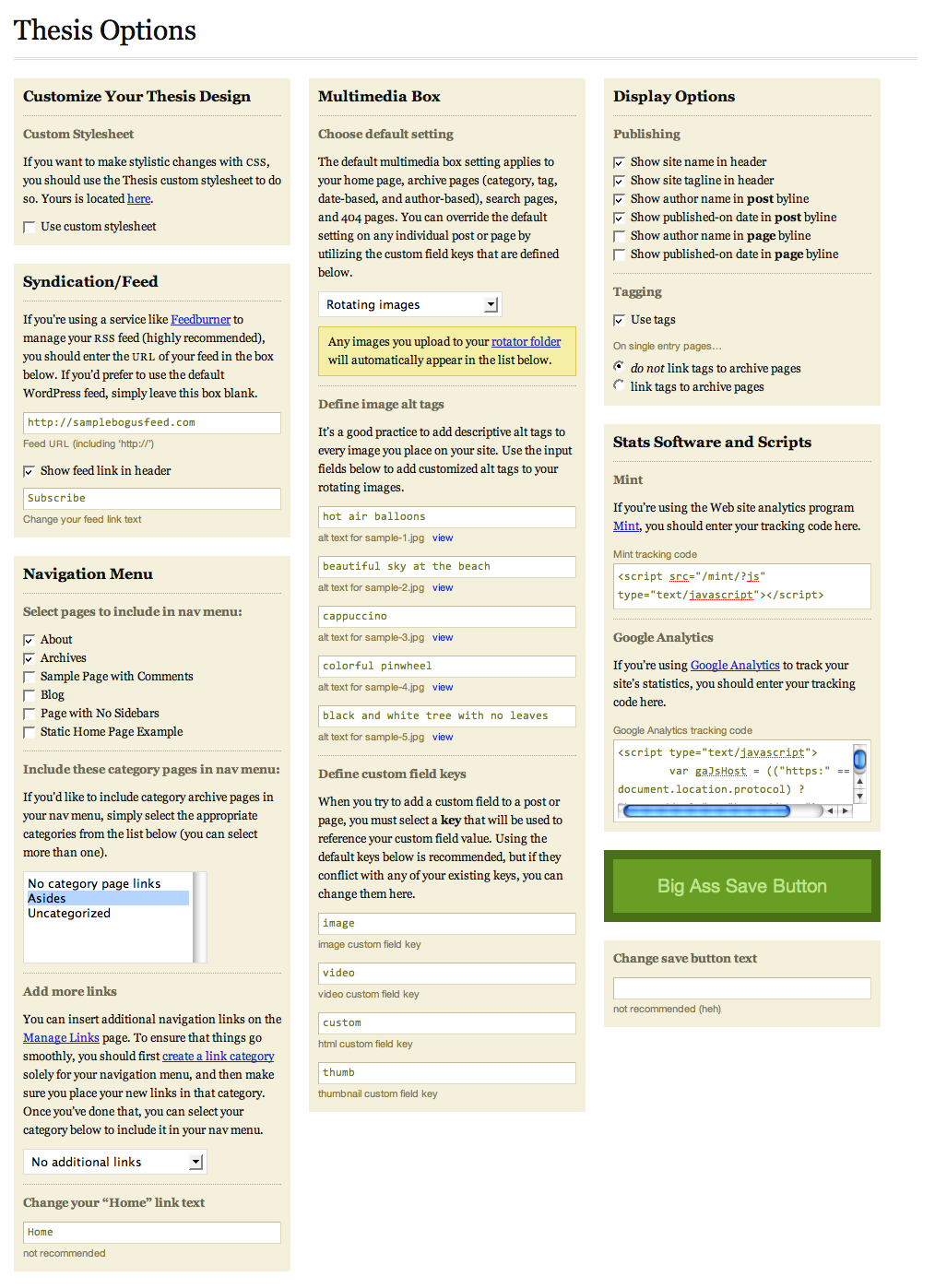
    I very much like the Wordpress Thesis theme that Chris Pearson sells:
    http://diythemes.com/thesis/get-thesis/
    http://diythemes.com/thesis/images/thesis-options.png

    Is there any reason this could or should not be adapted to EE if I bought it from Chris?  (I can’t find a way to post the question to him before purchasing.)

    It’s obviously created for Wordpress, and I assume if I bought it I could adapt it (or hire someone to do so).  Any reason not to think that?

    Since it is created for Wordpress, would it be too hard to adapt for EE?

    Sorry if these are silly questions.

    Any related thoughts on the matter are also welcome.

      Thanks!

  • #2 / Aug 18, 2008 6:56pm

    Ingmar

    29245 posts

    No, that should be quite straight forward to adapt for EE. It might be easiest to just take the XHTML output and put that into your template fields.

  • #3 / Aug 18, 2008 7:16pm

    Sue Crocker

    26054 posts

    That’s how I convert my Wordpress themes themes, by installing them in a sample site.

  • #4 / Aug 18, 2008 8:20pm

    jHuynh

    5 posts

    Thanks to you both for your quick replies.

    LOL—I don’t even know how to do what you are saying.

    How long would it take a smart friend experienced in EE to do this?

    How long would it take a newbie to do this? Would I start with EE tutorials, etc.?
    Is there a specific resource that would help me adapt the theme to EE?

    (I just heard from the moderator of the Thesis Theme forum that Chris would probably love having the theme ported to another platform.)

    Warm regards from Chicago.

  • #5 / Aug 18, 2008 9:51pm

    Tyssen

    756 posts

    How long it takes someone experienced with EE will depend on what type of content you intend having on your site.

    How long it takes a newbie would depend on how quickly you learn things.

  • #6 / Aug 19, 2008 12:03am

    jHuynh

    5 posts

    Thanks.  I am asking irrespective of content, e.g., just to make the theme “EE ready”—equivalent to the themes that one can download here for EE, and which don’t have content.

  • #7 / Aug 21, 2008 11:18am

    e-man

    1816 posts

    Porting a Wordpress template to EE requires some basic html/css skills… but porting that control panel over is a lot trickier for someone who’s just starting.
    I’m a bit baffled that so there are so many rave testimonials on their website for what is basically a 3-column blog template, althought the support and forum seems top notch. Just my 2ยข

  • #8 / Aug 21, 2008 5:57pm

    Marcus Neto

    1005 posts

    jhuynh, start with the boyink chronicles 😉 I am joking of course. But Michael Boyink has written some very detailed instructions on how to do just what you are describing. The person doing the work would have to be fairly proficient with HTML and CSS as well. But can find that tutorial set at this link

    http://www.boyink.com/splaat/weblog/category/building-an-expressionengine-site/

    It would be a fairly simple proposition though…

    M.

  • #9 / Aug 21, 2008 6:45pm

    the_crimsonrooster

    264 posts

    just wondering, why are you leaving wp?

  • #10 / Dec 27, 2008 2:51am

    jHuynh

    5 posts

    Sorry for the super-belated reply.  I am not switching.  Haven’t used anything yet.  I like EE, bought it a few years ago, but am not technically inclined so I never used it.  So I need to find an inexpensive template for whatever CMS I use.

  • #11 / Dec 27, 2008 5:13am

    Sean C. Smith

    3818 posts

    I’ve taken a few xhtml/css templates and EE’d them in a few hours. I can’t imagine that a wordpress theme would be any different. All you need to do is take the theme and swap out wordpress code for EE code.

    For a newb I would say just go slowly and keep track of your revisions so that you can back up if you make a mistake. One other thing is that the forum here is top notch for getting help from seasoned developers. That’s how I learned, trial & error and lots of questions on the forum.

    Additionally go through Michael Boyinks tutorials: Building an ExpressionEngine site and building a church site in ExpressionEngine.

    The best way to learn is to just do it, you don’t need to be technically inclined - all you need to be able to do is copy & paste and make minor modifications in the code based on what you’ve read and what is different in your site.

    The other thing I would suggest doing is following various forum threads related to ideas that you might want to do on your site or that the title sounds interesting to you. I regularly open various threads and click the “subscribd to this topic” link at the top of the thread in order to follow what’s going on and pick up tips that I can use for myself. it’s a great way to see how different people approach problems and can help you be a better trouble shooter.

    One of the first things I learned that way was dynamic=“off” is a very common solution to exp:weblog:entries problems. That doesn’t mean that’s always the answer, but if I now have a problem, I’ll drop that in to see if it solves the problem.

    anyhow good luck with your site, I’m sure with a little sweat and effort you’ll be more comfortable coding in no time.
.(JavaScript must be enabled to view this email address)

ExpressionEngine News!

#eecms, #events, #releases